HACCP on your kitchen display
Goods receipt in a few taps
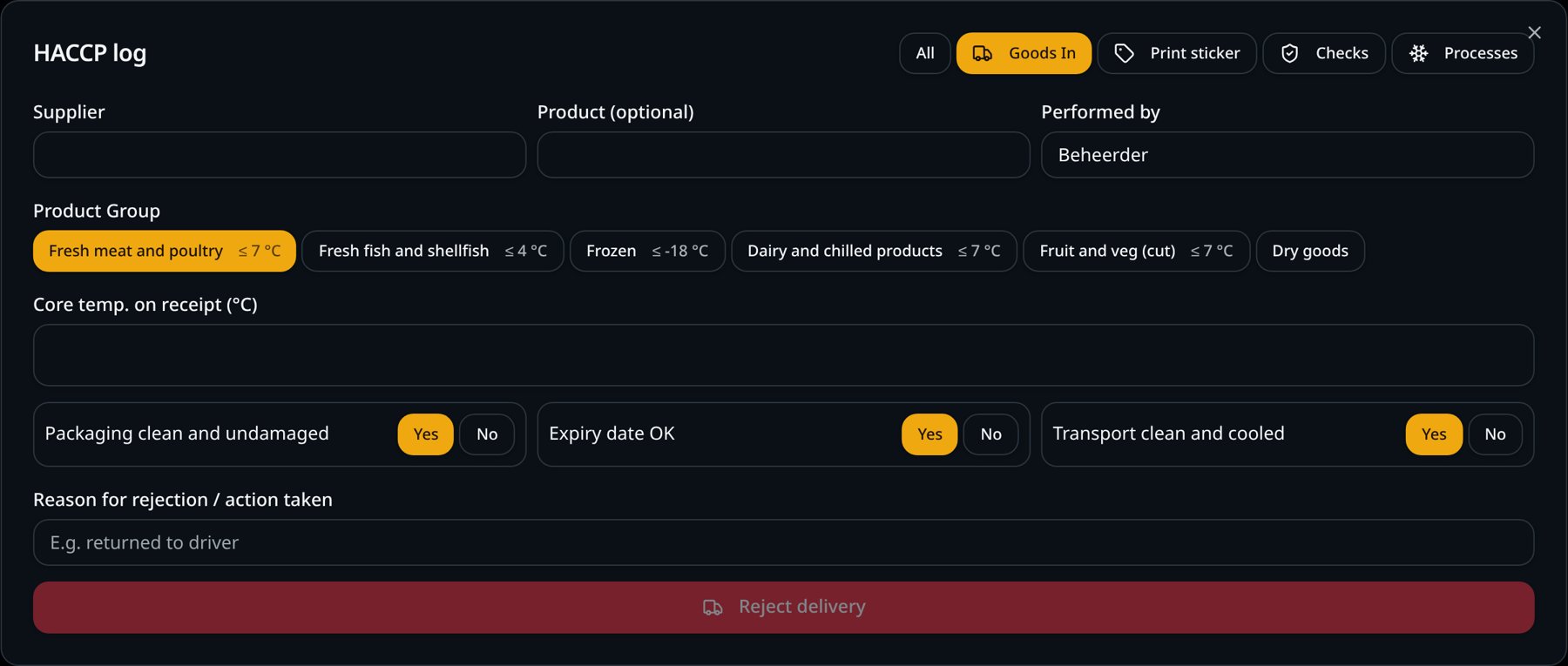
Choose the supplier and product group, measure the core temperature and answer three questions. The limit per product group is shown right away.
Deliveries go unchecked
A delivery arrives during prep and goes into the fridge unchecked. If the meat was delivered too warm, nobody knows.
How it works
- 1
Supplier and product group
Suppliers and products are remembered, so next time you pick them with one tap.
- 2
Measure core temperature
The limit is shown, such as fresh meat ≤ 7 °C and frozen ≤ −18 °C.
- 3
Three questions
Packaging, best-before date and transport.
- 4
Approve or reject
Reject with a reason or the action taken.
What you gain
- Every delivery checked
- Limits per product group on screen
- Rejected deliveries documented
- Fast thanks to saved suppliers
Real-world example
The butcher delivers minced meat at 9 °C. The screen shows the 7 °C limit; the cook rejects the delivery and records the reason.
Frequently asked questions
Do I enter every supplier again?
No. Suppliers and products are remembered.
What if a delivery isn't right?
You reject it with a reason or the action taken; it is stored in the log.
SmartPOSapp helps you record and keep your data, but it is not a certification. You remain responsible for your own food safety plan.
More HACCP features
Add HACCP to your kitchen display
HACCP recording is a paid add-on to the kitchen and bar display. We set everything up for you.